Revit files comparator
A tool to compare Revit files and find differences between them including those after update to newer version. This is the only known tool to do this and support BIM Managers to control the update of projects and families.
Overview
Tracking changes in models is an everyday task for BIM Managers. There are many tools to do so, but they all have 2 big problems: the elements and properties they check are hardcoded, if something else is changed - the tools will not track it; and they work only with files of the same Revit version.
Existing tools are focused on projects while familes are out of scope. Catalogue update to the new Revit version is a gamble - one never knows which features are changed in the format, what families silently become corrupt after update.
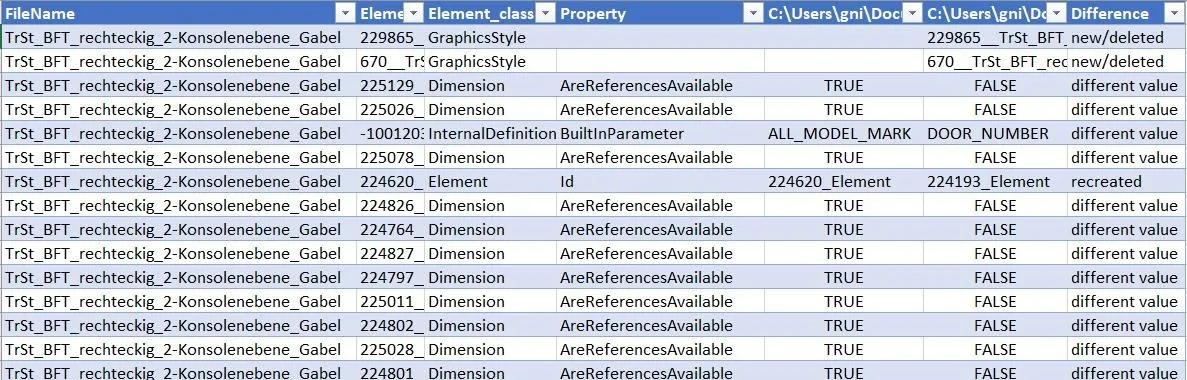
This tool uses a novel approach: it collects all data from Revit files available from API and compares them using advanced algorithm outside of Revit. The result - a table with mapping between old and new elements and properties including nested families with highlighted changes.
What I did
The need to track changes is not new, nevertheless its technical implementation in all available tools is insufficient to track changes one does not expect.
I wrote a programm to extract all available data from a Revit file to an intermediate storage and then compare them outside of Revit.
One of the biggest challenges was that Revit does not have any mechanism to keep unique identifier for elements in nested families. It is obvious for human to say what is the same element with different properties, but for computer it is not. Or what elements are technically new but actually are just a replacement of old ones.
The tool uses and advanced algorithm for document comparison considering these pitfalls and only reports the changes. Their criticality must be confirmed by the user.
Design decisions
The tool consists of 2 parts: a data extractor from Revit files and a document comparator.
It can work both with projects and families catalogues in batch mode.
It generates a raw report about found differences but the final decision is on the user as expert.
Outcome
The tool became the main instrument for quality control during yearly update of projects and families.
It helped a lot to detect corruptions in complex families which are invisible during human quality control like broken parametrization or alignments.
It produces a report over 5000 families just in couple of hours and covers each and every family instead of random samples.